How do memberships work?
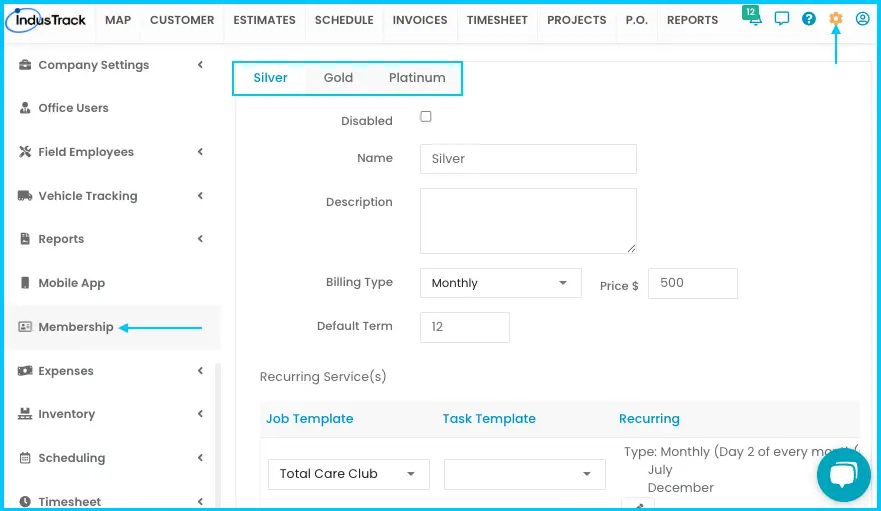
Set up your plans in Settings›Membership. IndusTrack comes with three plans (Silver, Gold and Platinum) that you can rename and customize. Once a membership is assigned to a customer, the recurring services it includes are added automatically.
Memberships can cover the cost of regular services and help keep customers coming back.
Set up a membership plan
Each plan has its own tab and is set up the same way, one at a time.
-
Go to Settings›Membership.
-
Open the plan's tab (Silver, Gold or Platinum).
-
Fill in the fields:
- Name: rename the plan if you like (for example, "Premium Plan"). The tab name changes too.
- Description: what's included and not included, and any benefits, discounts or special offers.
- Billing Type: One-time, Monthly, Quarterly or Twice a Year.
- Price: the price of the membership.
- Default Term: sets both the length of the membership and its billing term.
Watch: Filling in a membership plan's name, description, billing type, price and term -
Add recurring services (below).
-
Click Save.
Plans are enabled by default. To make one unavailable, check Disabled.
Add recurring services
Recurring services are jobs that the membership includes on a regular schedule.
-
Choose a Job Template from the drop-down. This unlocks the task template and recurring options.
-
Select the Task Template linked to that job.
-
Click the repeat icon and choose the frequency:
- Weekly: in Recur every, choose how often (for example, every 1 or 2 weeks), then select the day or days of the week.
- Monthly: choose the day of the month (for example, the 15th) and the month or months.
-
To add more, choose another job template and repeat.
Watch: Adding a recurring service with a job template, task template and frequency -
Click Save.
For job and task templates, see How do I use job and task templates?
Common questions
How do members get a discount?
Set the membership discount in Settings›PriceBooks›Markups. It sets a Member Price on your flat rates, and you can change it at any time. See How do I set up my pricebook?
Was this article helpful?
Contact support