Release 105 (October 25, 2026)
Release 105 lets you choose the columns in each Jobs Queue tab, edit submitted forms from the office, export scheduled reports as CSV or Excel, and change the color of several jobs at once. It also removes a mobile app setting and fixes several bugs.
New features
-
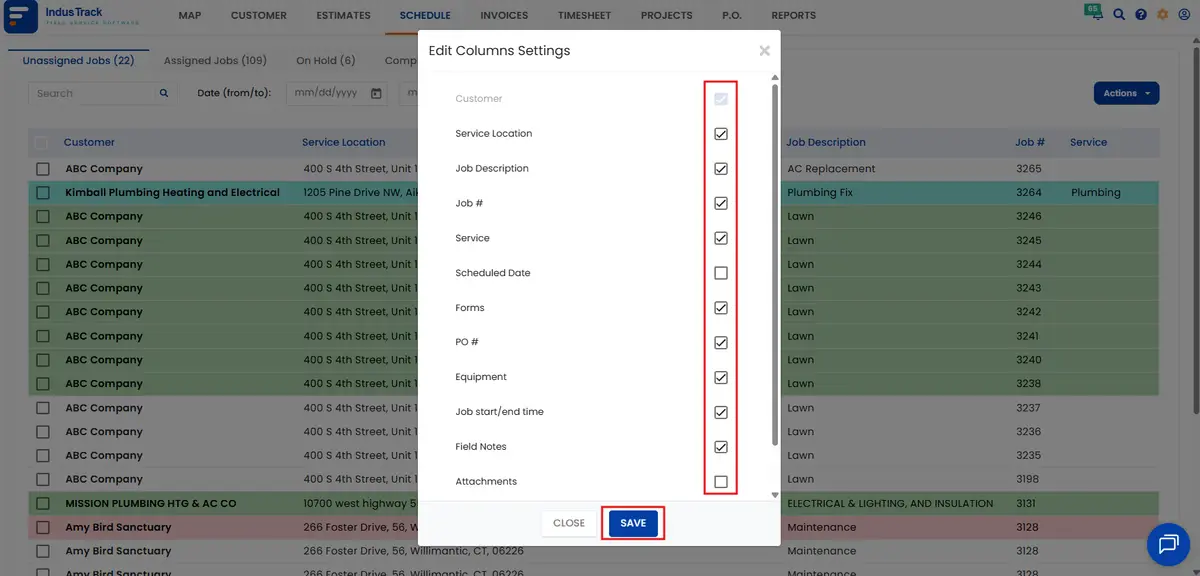
Choose the columns in the Jobs Queue: each Jobs Queue tab now has Actions›Configure Columns, so you can add or remove columns tab by tab. New columns include Forms, PO #, Equipment, Job Start/End Time, Field Notes, Attachments and Items/Parts. Tabs keep their default columns until you change them. See How do I use the schedule and the jobs queue?
-
Edit submitted forms from the office: open the job, go to the Forms section, hover over the form and click the pencil icon. See How do I edit, reassign or delete a job?
-
CSV and Excel for scheduled reports: every report in the Report Scheduler (Settings›Reports›Schedule) can now be sent as CSV or Excel as well as PDF. See How do I schedule a report to email automatically?
-
Change the color of several jobs at once: in the Jobs Queue, check the jobs, then click Actions›Set Color.
Improvements
None.
Bug fixes
- Fixed an issue where vehicle engine hours didn't show correctly.
- Fixed an issue where deleted payment terms still appeared when creating a purchase order.
- Fixed an issue where a form trigger could be updated with no linked form after its form was deleted.
- Fixed an issue where office users weren't notified when the job description or certain other job fields were updated.
Breaking changes
- Can Driver Edit Sync Interval removed: this setting is gone from Settings›Mobile App›General. Field employees can no longer change the sync interval in the mobile app; the office's Sync Frequency applies to everyone.
Known issues
None.
Was this article helpful?
Contact support