How do I schedule a report to email automatically?
Go to Settings›Reports›Schedule, click Actions and select + Add New. Choose the report, how often it's sent, the format and the recipients, then click Save.
Set up a schedule
-
Go to Settings›Reports›Schedule.
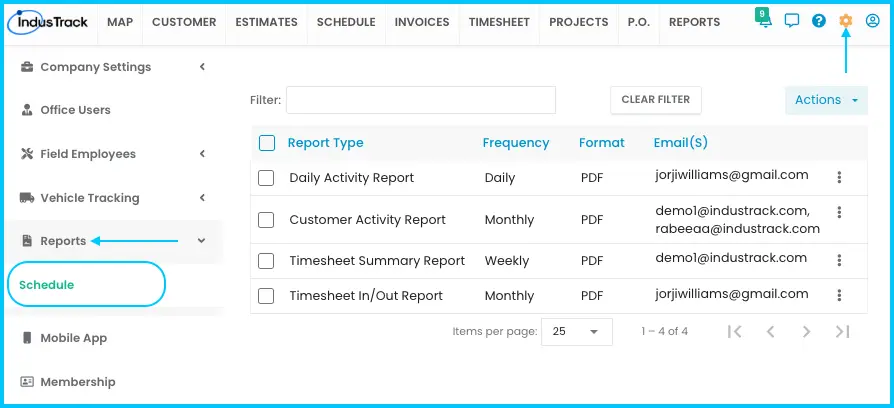
-
Click Actions and select + Add New.
-
In the Report Scheduler window:
- Choose the Report Type.
- Select the Employees, Vehicles or Inventory Items to include, if the report asks for them. Financial reports need no extra options.
- Choose how often to send it: Daily, Weekly or Monthly. For Daily, choose whether to send on weekends.
- Choose the format. The default is PDF.
- Select the recipients. Recipients must have email enabled in IndusTrack.
-
Click Save. The schedule is active.
Watch: Adding a report schedule in the Report Scheduler window
Some reports also have Schedule Report in their Actions menu. It opens the same Report Scheduler.
Edit or delete a schedule
-
Go to Settings›Reports›Schedule and find the report in the list.
-
Click the 3-dot menu (⋮) next to it.
- Edit: make your changes and click Save.
- Delete: confirm by clicking Yes.
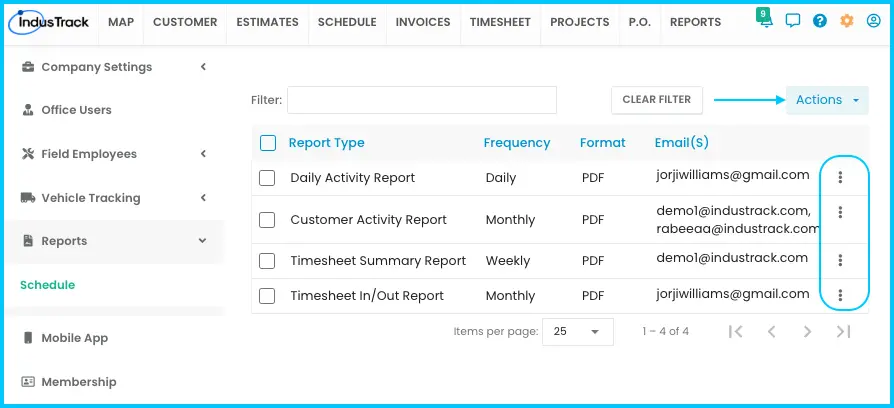
Watch: Editing and deleting a report schedule
You can also delete schedules from the Actions button.
The schedule list
| Column | Shows |
|---|---|
| Report Type | The report being sent |
| Frequency | How often it's sent |
| Format | File type |
| Email(s) | Who receives it |
| ⋮ | Edit or delete |
Common questions
An office user isn't receiving the scheduled report. Why?
Office users only receive scheduled reports if email is integrated with their account. See How do I connect my email?
Which reports can I schedule?
- Timesheet: Timesheet In/Out Report, Timesheet Summary Report, Timesheet Detail Report, Timesheet Sage Report
- Scheduling: Job report, Item Used
- Vehicle Tracking: Customer Activity Report, Daily Activity Report, Engine Diagnostic Report, Fleet Summary Report, Fuel Efficiency Report, Idle Report, Maintenance Reminder Report, PTO Report, Safety Report Data
- Financials: Accounts Receivable
Was this article helpful?
Contact support