How do I connect my email?
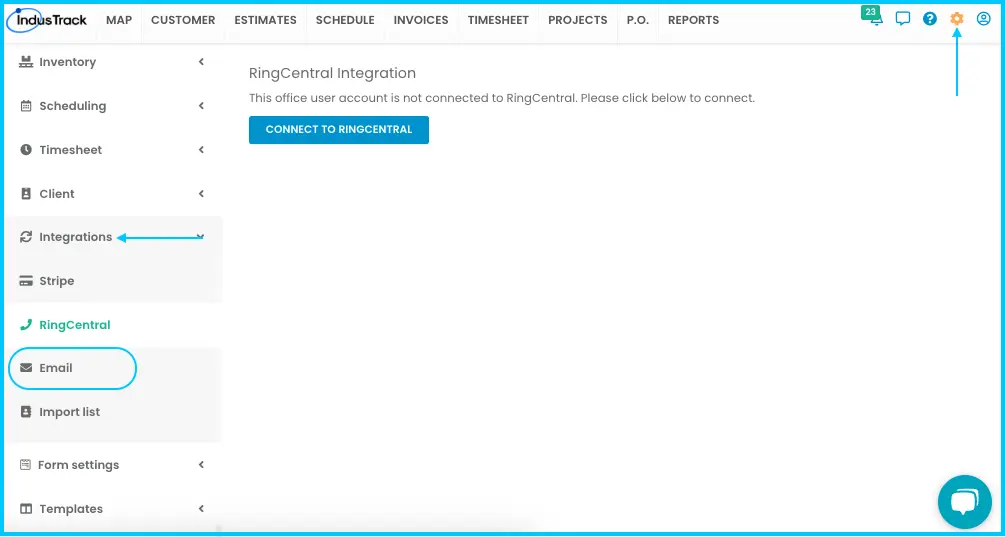
Go to Settings›Integrations›Emails and connect your company email account: Sign in with Google for Gmail, Office 365 for Microsoft email, or Other SMTP Connection for other providers such as Yahoo. Emails from IndusTrack are then sent from your company's address.
Gmail
-
Go to Settings›Integrations›Emails.
-
Click Sign in with Google.
-
Choose the Google account to use.
-
Allow the permission to "Send email on your behalf."
-
Click Continue. Your Gmail account is connected.
Watch: Connecting a Gmail account with Sign in with Google
Office 365 or GoDaddy
-
Go to Settings›Integrations›Emails.
-
Click Office 365.
-
Sign in with your Microsoft or GoDaddy email and password. Your email is connected.
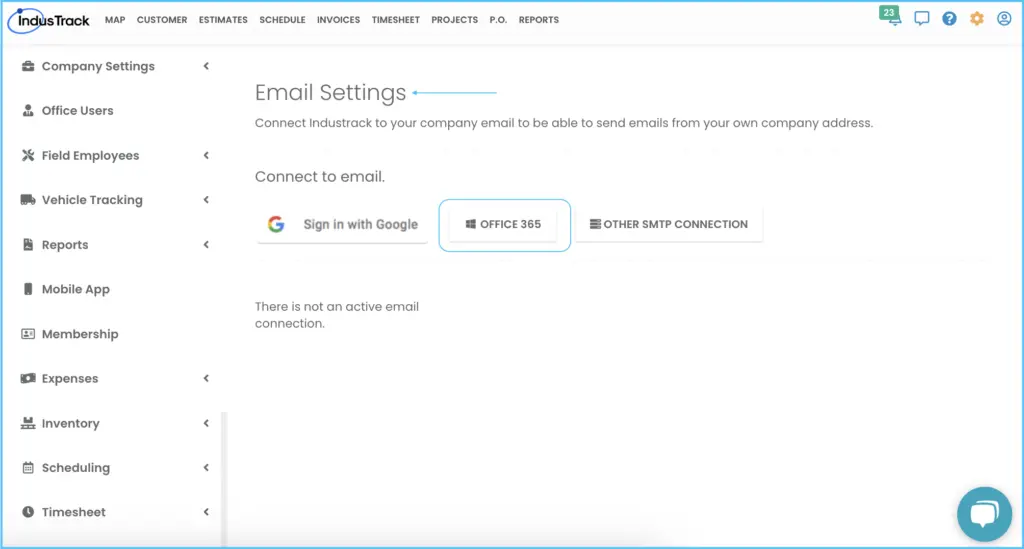
Always use Office 365 to connect GoDaddy email.
Other providers (Yahoo and others)
-
Go to Settings›Integrations›Emails.
-
Click Other SMTP Connection.
-
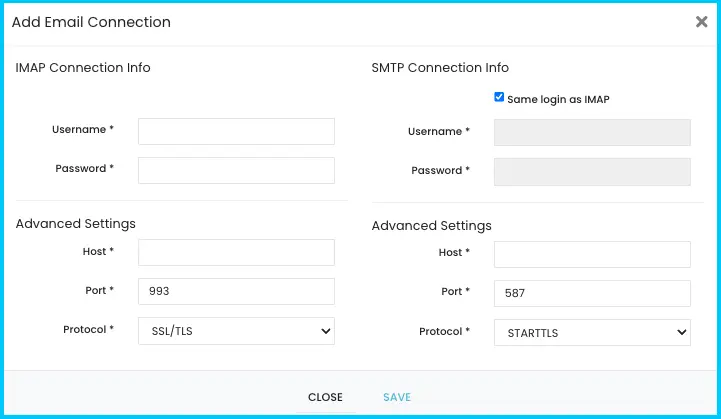
In the Edit Email Connection window, enter your Username and Password. Check Same login as IMAP to fill in the login details for both.
-
Enter your provider's IMAP and SMTP settings:
Setting Host Port Protocol IMAP Your provider's IMAP server 993 SSL/TLS SMTP Your provider's SMTP server 465 SSL/TLS -
Click SAVE.
Company-wide or per office user
You can connect email in two ways:
- Company-wide: one email account for the whole company.
- Per office user: an email account for an individual office user.
You need email connected at least one of these ways to send invoices and estimates to customers by email. When an office user emails an invoice or estimate:
- If they have their own email connected, it's sent from their email address.
- If they don't, it's sent from the company-wide email address.
Common questions
My Yahoo emails from IndusTrack go to the Junk folder. Why?
Use SMTP port 465 with protocol SSL/TLS. With port 587 and STARTTLS, emails from IndusTrack go into the Junk folder. For IMAP, use port 993 with SSL/TLS.
Does each office user need their own email connected to receive scheduled reports?
No. Anyone added as an office user and selected as a recipient of the scheduled report receives it by email.
Why can't I email invoices or estimates?
No email is connected. Connect one company-wide or for your office user.
Was this article helpful?
Contact support