What does each vehicle alert type mean?
IndusTrack has 13 alert types. Some need extra settings, such as a speed or a number of minutes, which appear once you pick the type.
| Alert type | Fires when | Extra settings |
|---|---|---|
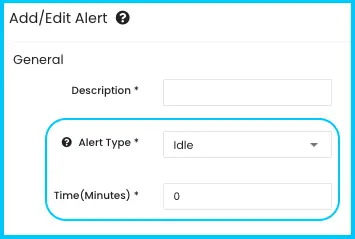
| Idle | A vehicle idles too long | Time (Minutes) allowed idling |
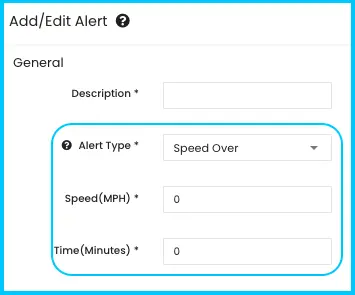
| Speed Over | A vehicle stays above a speed for too long | Speed (MPH) maximum; Time (Minutes) allowed over it. Set 0 minutes to alert every time |
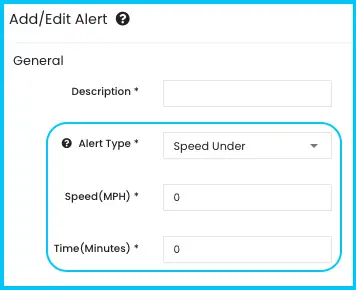
| Speed Under | A vehicle stays below a speed for too long | Speed (MPH) minimum; Time (Minutes) allowed under it |
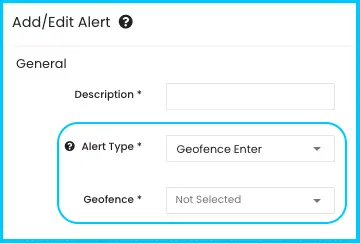
| Geofence Enter | A vehicle enters an area | Geofence to watch |
| Geofence Leave | A vehicle leaves an area | Geofence to watch |
| Ignition On | The engine is turned on | None |
| Ignition Off | The engine is turned off | None |
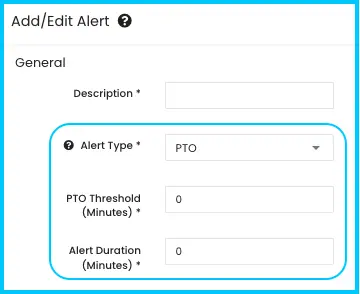
| PTO (Power Take-Off) | PTO runs longer than expected | PTO Threshold (Minutes); Alert Duration (Minutes) the condition must last |
| Check Engine Light On | The check engine light comes on | None. OBDII plug-in devices and supported vehicles only |
| Quick Acceleration | The vehicle speeds up rapidly | None. Uses the device's accelerometer |
| Hard Braking | The vehicle brakes suddenly | None. Uses the device's accelerometer |
| Aggressive Cornering | The vehicle turns sharply too fast | None. Uses the device's accelerometer |
| Power Disconnect | The GPS device is unplugged or loses power | None |
Common questions
Why do speed alerts have a time setting?
It prevents unnecessary alerts for brief speed-ups or slowdowns. Always set one for Speed Over and Speed Under.
How do I get an alert every single time a vehicle speeds?
Set Time (Minutes) to 0 on the Speed Over alert.
Does the Check Engine Light alert work on my vehicle?
Only with OBDII plug-in devices on supported vehicles. Contact IndusTrack Support to check yours.
Where do geofences come from?
You pick an existing geofence when creating the alert. Geofences are created from the customer's profile. See How do I set up a geofence for a customer?
Was this article helpful?
Contact support