How do I turn an estimate or completed job into an invoice?
For an estimate, click the three dots next to it in the Estimates module and choose Convert to Invoice. For a completed job, go to Schedule›Actions›Jobs Queue, approve the job, then choose Convert to Invoice from the Approved for Invoice column.
From an estimate
-
Go to the Estimates module and find the estimate.
-
Click the three dots next to it and choose Convert to Invoice.
- Or open the estimate and click Actions›Convert to Invoice.
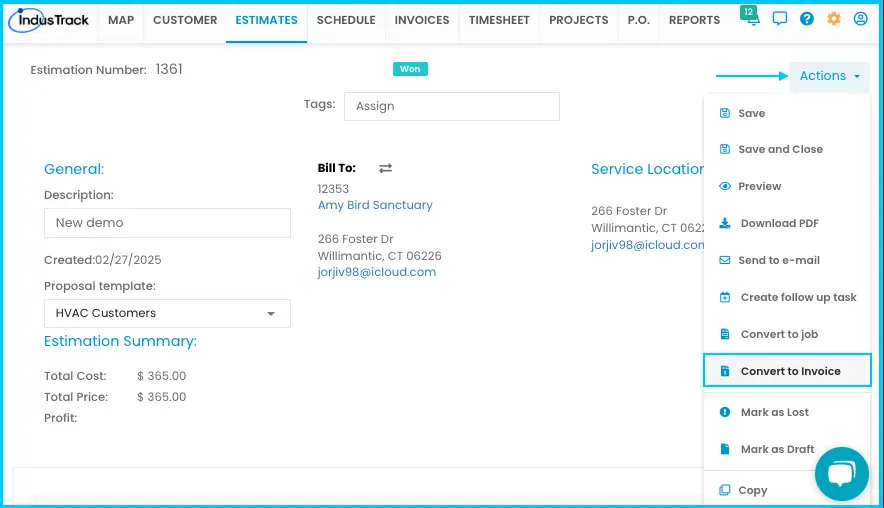
-
The Create an Invoice window opens in the Invoices module. Materials, labor, services, notes, taxes, discounts, customer details and payment terms are copied from the estimate.
-
Review and edit anything you need.
-
Click Save or Save and Close.
Watch: Converting an estimate to an invoice from the estimate list
The estimate's status changes to Invoiced, the invoice appears in the Invoices module, and it's added to the customer's profile.
From a completed job
-
Go to the Schedule module and click Actions›Jobs Queue.
-
Find the job in the Completed Jobs column.
-
Click the three dots next to it and choose Approve. The job moves to Approved for Invoice.
-
Click the three dots next to the job and choose Convert to Invoice.
-
The invoice edit page opens. Make any changes and save.
Watch: Approving completed jobs in the Jobs Queue and converting them to one or more invoices
Combine several jobs into one invoice: in the Jobs Queue, check the boxes for jobs from the same customer and click Create One Invoice for Multiple Jobs. The invoice edit page opens.
You can also convert a job from the Jobs tab of the customer's profile: click the three dots next to the job and choose Convert to Invoice.
Other ways to create an invoice
You can also start an invoice from scratch in the Invoices module, or from the Invoices tab of a customer's profile by clicking + Add New. See How do I create and manage invoices?
Common questions
Why is Convert to Invoice greyed out on an estimate?
The estimate has already been converted to an invoice.
Does the invoice link back to the job?
Yes. Each invoice shows a link to its job or jobs, and any purchase orders attached to those jobs also appear on the invoice.
I got a warning when converting a job. Why?
The job isn't marked Complete. Update the job status to Complete first, so you only bill for finished work.
If I change custom pricing before converting an estimate, which discounts are used?
The updated ones. A discount you typed by hand on the estimate stays. See How does custom pricing work?
Was this article helpful?
Contact support